CaptureXT Screen Capture3.0.3
Publisher Description
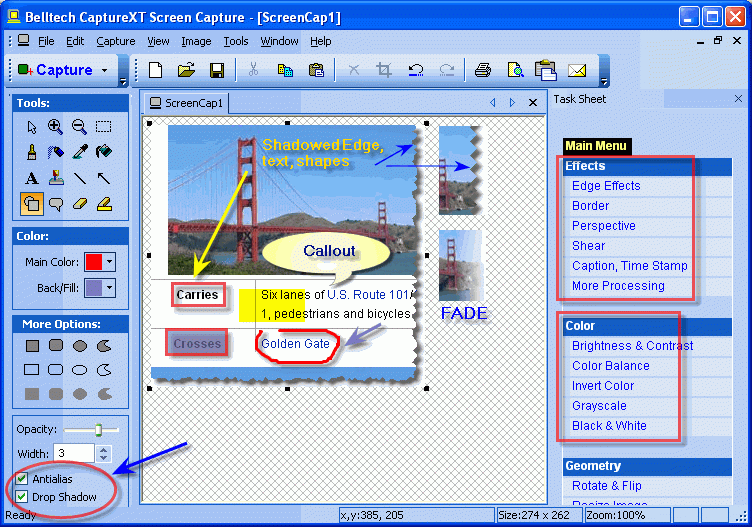
Belltech CaptureXT Screen Capture is a professional quality screenshot taker and professional presentation software for Windows. It can capture full screen, active window, any rectangular area or freehand region, all in a few clicks. Capture program menus, multiple areas, activate capture with hotkeys and more. After capturing the image, you can edit it in many ways like put text, lines, arrows, translucent shapes, add stamps and more to enhance your communications and illustrate your ideas easily and effectively. Add shadow effect to your text and shapes. You can also apply a variety of image effects like shadows, torn edges, faded edges, perspective view, blur, emboss and more. After your editing is complete, you can copy paste to your presentation or save as popular image format (jpg, gif, bmp, png) or quickly send to someone by email. CaptureXT Screen Capture is useful for creating manuals, training handouts, presentations, marketing materials, web pages, sharing error screens or capturing online receipts. CaptureXT can also be used as an image editor with its moderate image editing features like change brightness contrast, resize image, rotate flip and more.
About CaptureXT Screen Capture
This Screen Capture program is available in English. It was last updated on 29 September, 2026. CaptureXT Screen Capture is compatible with the following operating systems: Windows, Windows-mobile.
The company that develops CaptureXT Screen Capture is Belltech Systems. The latest version released by its developer is 3.0.3. This version was rated by 12 users of our site and has an average rating of 2.9.
The download we have available for CaptureXT Screen Capture has a file size of 3.1 MB. Just click the green Download button above to start the downloading process. The program is listed on our website since 2012-01-05 and was downloaded 742 times. We have already checked if the download link is safe, however for your own protection we recommend that you scan the downloaded software with your antivirus. Your antivirus may detect the CaptureXT Screen Capture as malware if the download link is broken.
How to install CaptureXT Screen Capture on your Windows device:
- Click on the Download button on our website. This will start the download from the website of the developer.
- Once the CaptureXT Screen Capture is downloaded click on it to start the setup process (assuming you are on a desktop computer).
- When the installation is finished you should be able to see and run the program.
Program Details
System requirements
Download information
Pricing
Version History
version 3.0.3
posted on 2012-01-05
Windows 7 support added. Capture from multiple monitors. Text input box settings are now saved.
version 2.2.4
posted on 2006-10-18
Real-world shadow feature added for image edit. Updated UI.
